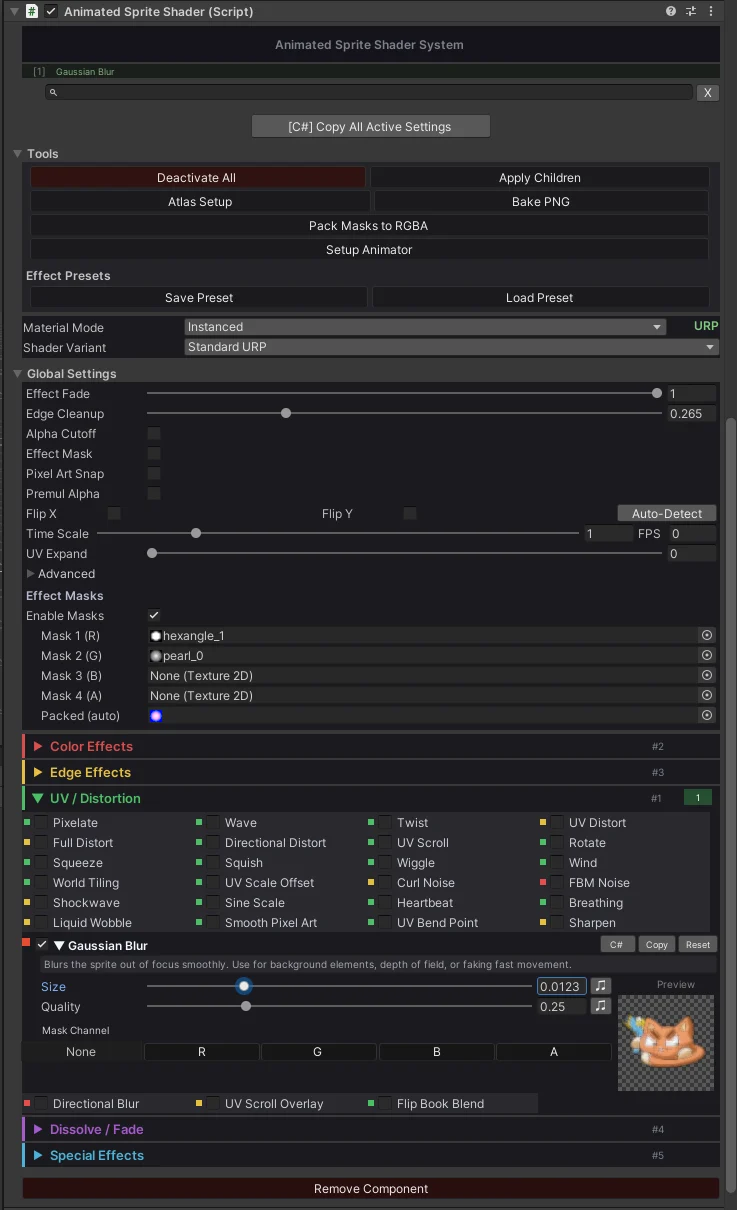
This is the main workflow. Add the component, pick effects, and tune them here.
Search and filters
Search by effect name or keyword to find the control you need faster.
Performance dots
Green, yellow, and red dots show the relative cost of an effect before you commit to it.
Active summary
The top summary shows which effects are enabled on the selected object.
Keyframe buttons
Use the keyframe button next to supported fields to animate values without manual setup.
Copy, paste, reset
Copy one effect, paste it to another sprite, or reset only that effect instead of the whole component.
Code copy
Use the C# copy button or Copy All Active Settings to generate field assignments for scripts.
Tools
Use the tools area for presets, sprite atlas setup, and SDF baking.
Global settings
Mask textures, global fade, pixel snap, stencil, and lighting controls are grouped in one place.
Live preview
Expanded effects show a live preview so you can tune values without guessing.