Water Source settings for underwater illumination, floor shading, and weather.
Light rays
Water Source · FX · Light rays
| Setting | Effect |
|---|
| Amount | Scales the brightness of the underwater light rays. |
|---|
| Length | Set the underwater reach of rays. |
|---|
| Ray color gradient | Ray colour keys from their source to their end. |
|---|
| Motion amount | Scales the moving intensity mask along a ray. Edge softness has its own control. |
|---|
More light rays settings
| Setting | Effect |
|---|
| Density | Control ray placement density; the active pool remains bounded by the quality policy. |
|---|
| Motion speed | Sets how fast the intensity mask scrolls through a ray. |
|---|
| Intensity variation | Varies brightness along the animated ray mask. |
|---|
| Style | Choose the ray sprites style. |
|---|
| Blend | Choose a prepared compositing blend or the custom blend settings. |
|---|
| Custom direction | Use an authored ray direction instead of following the shared sun direction. |
|---|
| Direction | Reference-plane direction. Y points upward; (0,-1) is straight down. |
|---|
| Placement | Choose how ray origins are distributed across the source. |
|---|
| Left / right range | Normalized left/right limits for ray sources. |
|---|
| Front / back range | Normalized front/back limits for ray sources in Fake Z. |
|---|
| Vertical offset | Offset ray origins relative to the waterline. |
|---|
| Texture | Optional sprite mask. Full UV rectangle, luminance multiplied by alpha. Empty uses a soft procedural ribbon. |
|---|
| Texture motion | Animate the ray sprites without moving the whole source. |
|---|
| Sun color influence | Mixes the ray’s own colors with the shared Water Sun color and intensity. |
|---|
| Width range | Minimum and maximum ribbon half-width in water units. |
|---|
| Spread | Widens each ray toward its lower end. Its source stays in place. |
|---|
| Variation | Vary individual rays to reduce repeated silhouettes. |
|---|
| Edge softness | Soften ray boundaries. |
|---|
| Length fade | Additional artistic absorption along raster beams, per world unit. |
|---|
| Hide through top surface | Hide light shafts where the view enters water through the upper free surface. Side and underwater views retain shafts. |
|---|
| Draw distance | Cull rays beyond the supported camera distance. |
|---|
| Source blend | Select the source blend factor when using custom ray blending. |
|---|
| Destination blend | Select the destination blend factor when using custom ray blending. |
|---|
| Placement seed | Change deterministic ray placement without changing source bounds. |
|---|
Floor appearance
Water Source · Water bottom · Floor appearance
| Setting | Effect |
|---|
| Floor tint | Floor color and opacity before optical attenuation. |
|---|
| Floor texture | Floor pattern mapped in XZ world units, below the surface and actors. |
|---|
| Floor tiling | Floor texture repeats per X/Z world unit. |
|---|
| Water color with distance | Blends the water gradient into the floor with distance through the water. Zero preserves the original floor color even when the floor is revealed. |
|---|
| Color distance | Distance through water at which the bottom approaches the interior gradient colour, independent of reveal. |
|---|
| Reveal through water | Fades the overlying water and surface details above the projected floor. The floor can still receive the water gradient with distance. |
|---|
Caustics
Water Source · Water bottom · Caustics
| Setting | Effect |
|---|
| Atlas resolution | Set the projected caustic atlas size on routes that use an atlas. Low's texture path does not allocate it. |
|---|
| Amount | Scale caustic illumination intensity. |
|---|
| Color | Tints caustic light on the enabled receivers. |
|---|
| Texture | Assign a caustic image or atlas for texture-based styles. |
|---|
| On objects | Apply caustics to eligible submerged sprite appearance. |
|---|
| On floor | Apply caustics to the water's floor representation. |
|---|
| Scale | Change the spatial tiling of the caustic pattern. |
|---|
| Motion | Scale caustic animation speed. |
|---|
More caustics settings
| Setting | Effect |
|---|
| Reach | Set the depth range over which caustics remain visible. |
|---|
| Softness | Soften caustic intensity transitions. |
|---|
| Pattern style | Choose the authored caustic implementation. Low resolves to texture flow while preserving this saved choice. |
|---|
| Focus | Adjust concentration of the selected caustic style. |
|---|
| Distortion | Warp the texture-based caustic pattern. |
|---|
| Animation frames | Set the number of animation frames in the caustic atlas. |
|---|
| Atlas columns | Number of columns in the caustic atlas. |
|---|
| Atlas rows | Number of rows in the caustic atlas. |
|---|
Rain
Water Source · FX · Rain
| Setting | Effect |
|---|
| Intensity | Scales cosmetic drop emission and physical ripple frequency together. |
|---|
| Wind | Physical X/Z wind in metres per second. Virtual Z drops use the water's depth projection. |
|---|
| Color | Tint rain drops. |
|---|
| Drop speed | Set drop fall speed. |
|---|
| Drop width | Set the screen-space thickness of rain streaks. |
|---|
| Streak length | Set visible rain streak length. |
|---|
| Ripple strength | Target ripple height in world units, independent of the interaction-wave profile. The solver still respects its stability and height limits. |
|---|
| Ripples per second | Physical disturbance rate. Changing this preserves the cosmetic drop sequence. |
|---|
More rain settings
| Setting | Effect |
|---|
| Drop density | Cosmetic streak emission per second. Changing this preserves the physical ripple placement sequence. |
|---|
| Ripple size | Ripple radius in world units. The physical source spans at least two simulation intervals to avoid alignment-dependent disappearing impacts. |
|---|
| Drop texture | Assigns artwork for a rain streak. The drop and ripple settings have separate effects. |
|---|
| Fall speed variation | Varies individual streak speeds around the authored fall speed. |
|---|
| Fade in (s) | Time each streak takes to reach the authored opacity after it appears. |
|---|
| Fade out (s) | Time over which each streak loses opacity at the end of its lifetime. |
|---|
| Drop height | Set the drop spawning height above the surface. |
|---|
| Camera override | Choose a camera explicitly when the normal source camera is unsuitable. |
|---|
Examples
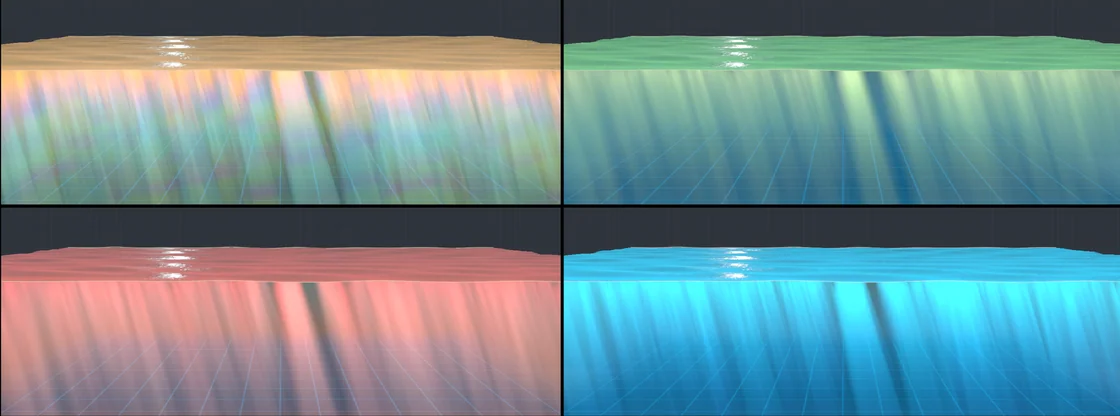 Underwater Light Rays compares beam settings side by side.
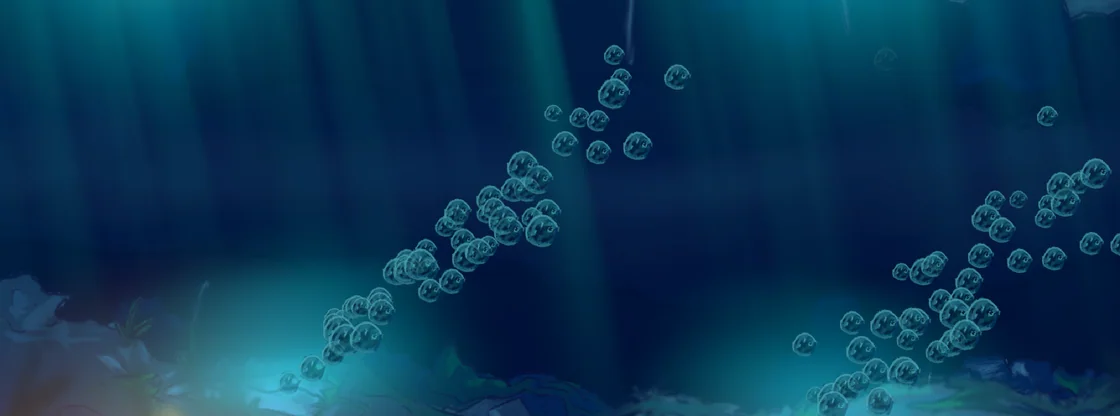 Underwater Cavern uses light rays and a separate bubble generator.