Shape a beam
Edit a Manual Quad in the Scene view, or use a sprite or collider emitter as described in the manual.
LIGHTING & ATMOSPHERE
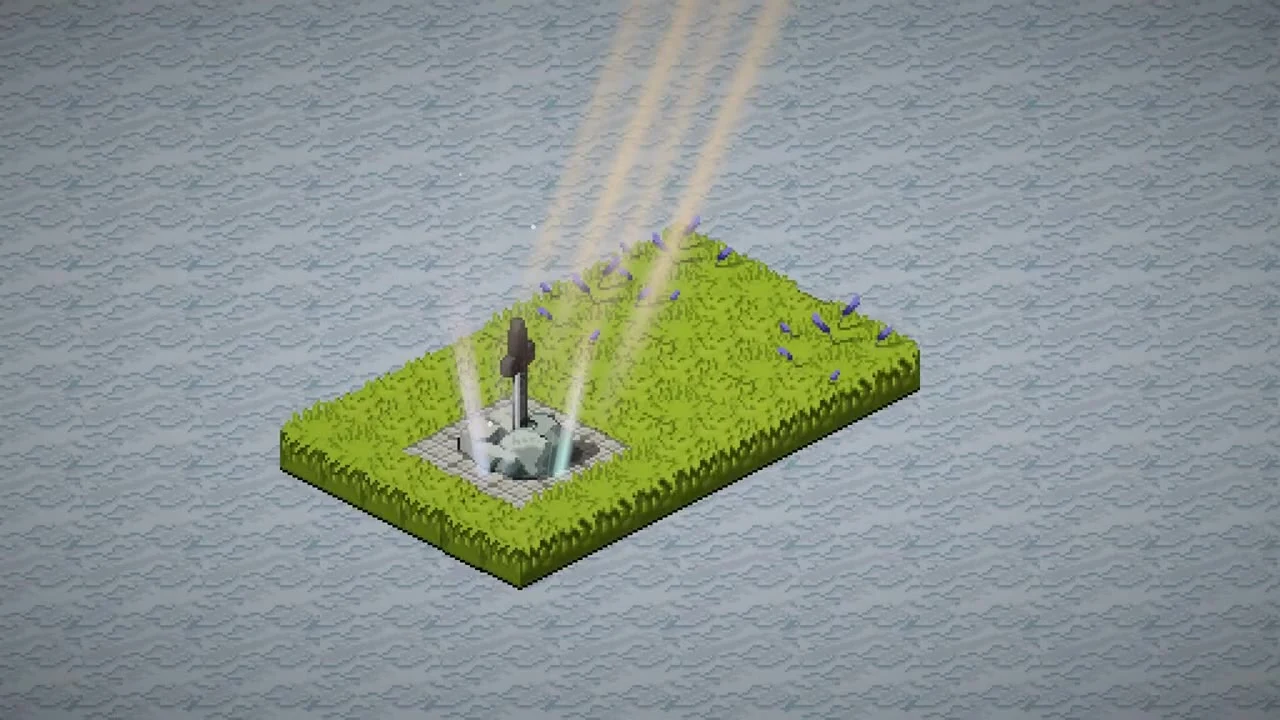
Create a ray, start with a Quick Look, then edit its shape, colour and sorting. Add a matching Light2D when the beam should illuminate lit sprites.
Place light shafts, shape their edges and add particles to a 2D scene.
View on Asset Store ↗Adjust the look of light shafts in the same window scene.
Read this feature's guide ↗Clips are from the supplied Light Rays trailer. It shows an earlier interface; use the LightRays 2 manual for current controls.
Project requirements
Use Unity 6000.0.66 (6.0.66) or newer with URP. The documented workflow uses the 2D Renderer. Older editor support stated in the supplied manual is not advertised as the current release baseline.
Listed compatible editors: 6000.0.66f2. These entries are not an upper-version limit. Listing checked 27 October 2026.
First steps
Check that the active URP pipeline uses a 2D Renderer Data asset.
Use Tools → Light Rays 2D → Create, or add Light Rays 2D to a GameObject.
Choose a Quick Look, edit the quad handles, and set Sorting Layer and Order.
Edit a Manual Quad in the Scene view, or use a sprite or collider emitter as described in the manual.
Use corner colours or gradients to colour the beam. Choose a blend mode to control how it combines with the scene.
Enable Create Matching Light2D for actual illumination of URP 2D lit sprites. The visible beam alone is not the same as scene lighting.
Before you buy
For setup or customisation issues, use Discord support.
Ask a product questionThe visible ray and scene illumination are separate. Enable Create Matching Light2D and use lit sprite materials when illumination is needed.
The supplied manual describes Manual Quad handles, shape presets, and sprite or collider emitters.
Check intensity, sorting, scale and blend mode. For pink materials, check URP and the 2D Renderer first.